1. Hart modem built-in power mode (suitable for offline debugging, no external power supply)
Applicable scenarios: instrument off-line debugging, laboratory calibration, no PLC / DCS system on-site, Modem needs to provide power to the instrument.
Wiring method: Turn the modem control switch to the "24V / 250Ο" position, connect the modem's 24V terminal (red / positive) and 250Ω terminal (black / negative) to the meter's power supply terminal, forming a complete circuit.
Note: This is only applicable to two-wire transmitters and cannot be used with four-wire instruments or valve positioners. Do not connect an external power source at the same time to avoid damaging the device due to power conflict.
2. Parallel mode (suitable for online debugging, existing external power supply)
Applicable scenarios: The PLC/DCS system is already powered on-site, and the total impedance of the circuit meets the requirements (≥250Ω).
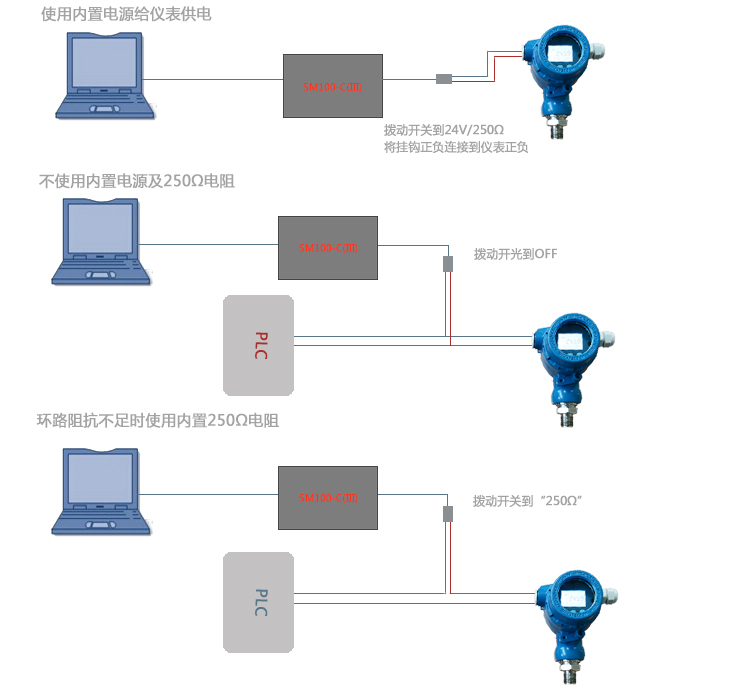
2. The hart modem is in power-off mode, with an empty gap in the middle.
Wiring method: Set the control switch of the modem to the "neutral position", and connect the modem directly in parallel (across) to the two wires of the instrument current loop, without distinguishing between positive and negative poles.
Note: It does not affect the normal operation of the original circuit and is suitable for online debugging. 3. Series compensation mode (suitable for online debugging, with existing external power supply but insufficient impedance)
Applicable scenario: There is already external power supply on site, but the total impedance of the circuit is insufficient (<250Ω), and the modem needs to supplement the impedance.
3. Hart modem no power mode, 250Ω range
Wiring method: Turn the modem control switch to the "250Ω" position, and connect the modem in series (parallel) between the two wires of the instrument current loop, without distinguishing between the positive and negative poles.
Note: This is only for impedance compensation and does not provide power.
Connecting the terminal device (mobile phone or computer)
Mobile phone/tablet connection (for Android/HarmonyOS devices that support OTG)
Hardware connection: Connect the modem to the phone/tablet using a USB OTG cable.
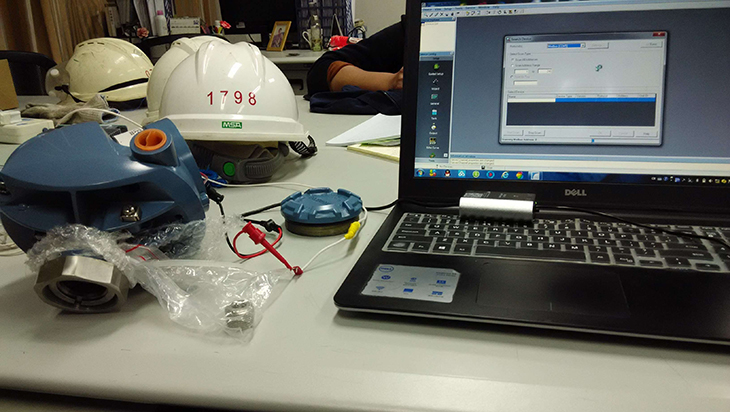
Software connection: Download and install the corresponding HART debugging app, select "USB device" or "USB connection" in the app, and wait for the app to recognize the device and connect. Computer connection (for Windows computers)
Hardware connection: Connect the modem to the computer using a USB cable.
Driver installation: wait for the computer to automatically install the USB to serial port driver for the modem, or manually install the corresponding driver, and restart the computer after installation.
Software connection: Install the HART debugging software (such as DeviceCare, PACTware, FieldMate, etc.), select the corresponding COM port in the software (you can check it in the "Device Manager" of the computer) to connect. Wireless connection:
Wi-Fi software connection: search for the wireless SM100-C (III) Wi-Fi signal in the mobile APP, establish the connection, and you can carry out Wi-Fi communication (special reminder: in the case of Wi-Fi, you need to power the hart modem separately).
Media Contact
Company Name: SONGMAO Electronic co., Ltd.
Email: Send Email
Country: China
Website: https://www.smmeter.com/