
A glowing customer review sitting in a text box on a website rarely gets the attention it deserves. People trust other people more than they trust marketing copy, but that trust only transfers if the testimonial actually catches someone’s attention long enough to read it.
Photo to video AI offers a way to give written or quoted testimonials real visual weight, turning a single customer photo and their words into a short, branded video that feels like a genuine moment rather than a block of quoted text.
Dreamina’s video tools, powered by the Seedance 2.5 model, make this kind of transformation possible directly from existing customer photography.
Why testimonials need visual weight to land
Written reviews compete with everything else on a page for attention, and most people skim past them entirely. A short video built around a real customer moment slows the scroll in a way plain text rarely manages, giving the testimonial’s actual words a far better chance of being read and believed.
Choosing which testimonials are worth animating
Not every review needs the video treatment. The strongest candidates usually share a few qualities:
- A specific, vivid detail rather than a generic compliment
- An accompanying photo with decent lighting and a genuine expression
- A testimonial that addresses a common hesitation new customers have
- Enough length to carry a short video without feeling thin
Building the video around the customer’s actual words
The visual motion in a testimonial video should support the words, not distract from them. Gentle, slow movement — a soft zoom, a subtle shift in light — keeps focus on the quote itself, while anything too energetic risks pulling attention away from the message the testimonial is actually there to deliver.

Pacing the reveal of text alongside motion
Rather than showing the full quote all at once, timing the text to appear gradually alongside the video’s gentle motion gives the testimonial a sense of unfolding naturally, almost like watching someone speak, even without actual spoken audio.
Matching video tone to the type of testimonial
Different testimonials call for slightly different visual energy:
- A heartfelt, emotional review benefits from warm, soft lighting and slow pacing
- A practical, feature-focused review can support slightly brisker, cleaner motion
- A funny or lighthearted testimonial can carry a touch more playful movement
Producing the testimonial video with Dreamina
Step 1: Upload reference image and write corresponding prompt
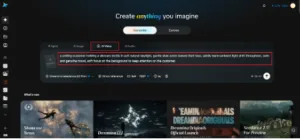
Visit Dreamina, sign in, and head to the “AI Video” section. Click “Add reference image” to upload the customer’s photo, then write a prompt describing the motion and mood you want.
For a 30-second testimonial video, try: a smiling customer holding a skincare bottle in soft natural daylight, gentle slow zoom toward their face, subtle warm ambient light shift throughout, calm and genuine mood, soft focus on the background to keep attention on the customer.
Reference the customer’s pose, expression, and the product they’re holding directly from the uploaded photo so the animation stays authentic to the original moment.
Step 2: Generate your video
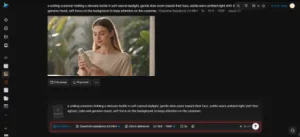
After adding the image and prompt, choose the Seedance 2.5 model for generation. Select a video length that matches your testimonial’s text length, then pick an aspect ratio suited to its final placement — 16:9 for a website testimonial section, 9:16 for a social story or reel. Click Dreamina’s icon and wait a few seconds for processing.
Step 3: Enhance & export the video
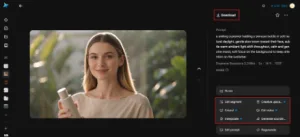
Use Dreamina’s AI editing tools to polish the clip before saving. Apply Upscale if the video will display large on a website page, or use Generate soundtrack to add a soft, understated audio layer that doesn’t compete with the on-screen text. Once it’s finished, export the video and add it to your testimonials page or social content.
How Seedance 2.5 supports authentic-feeling testimonial content
Testimonial videos depend on motion that reads as natural rather than staged, and this is a particular strength of the Seedance 2.5 model. It handles subtle human expressions and gentle camera movement with a soft, believable touch, avoiding the overly mechanical motion that can make a generated video feel fake.
That authenticity matters more here than almost anywhere else, since the entire point of a testimonial is trust, and a testimonial video that feels artificial undermines its own purpose.
Building a rotating testimonial video library
Rather than producing one testimonial video and reusing it indefinitely, building a small rotating set — five or six videos cycled through a website or social rotation — keeps the content feeling fresh and prevents any single customer’s story from feeling overused.
Getting permission before publishing
Before turning any customer’s photo and words into a video, it’s worth confirming they’re comfortable with that use specifically, even if they’ve already agreed to a written review being published — video can feel like a bigger step for some customers than a quoted line of text.
Conclusion
Turning a written testimonial into a short, genuine-feeling video gives real customer trust the visual weight it deserves.
With a clear sense of pacing, a well-chosen customer photo, and Dreamina’s Seedance 2.5 model handling the motion, a quoted review can become one of the most persuasive pieces of content a brand has, rather than a line of text most visitors scroll straight past.